
NEWS
Appraisers, check out this new display in Search
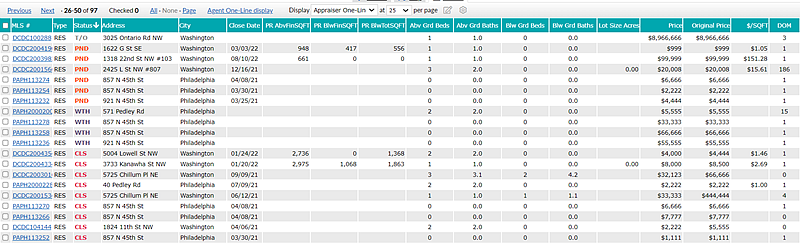
The new Appraiser One-Line display helps you find comparable listings for your appraisals even faster.
Based on your feedback, we created an Appraiser One-Line display to replace the Agent One-Line 1004MC display. This new display surfaces more of the information you need – and removes some items you don’t – so you can easily find comparable listings without having to click for more details.
We’ve replaced the Date and Total Square Feet columns with these:
- Above Grade Finished SQFT
- Below Grade Finished SQFT
- Below Grade Total SQFT
- Above Grade Bedrooms
- Above Grade Baths
- Below Grade Bedrooms
- Below Grade Baths
- Lot Size
- Close Date
You can access this display by going to the Appraisal Search (1004MC) available from Bright’s Search menu.
Also, a new field titled "Assessor AbvGrd Fin Sq ft" has been automatically included on the following reports when Assessor information is provided:
- Agent Thumbnail
- Agent Gallery
- Agent Full
- Agent One-page
- Agent Custom w/ Tabs
- Agent Synopsis
- Appraiser Report
- Agent 360
You now also have the option to add the Above Grade Finished SQFT Assessor field (as reported by your local Assessors office when available) to your one-line display search results.
At Bright, we want all our subscribers to work smarter, not harder. We hope these Search updates make your job easier.