
NEWS
Behind the Scenes: Remarks Word Checker
Learn about our automated validation check, designed to help you catch potential issues in your remarks and open fields before they become a compliance concern.
Bright MLS aims to have the most accurate and up-to-date listing information available to all subscribers so they can power their business and serve consumers. To accomplish this, compliance exists. Additionally, compliance exists to ensure adherence to regulatory and legal requirements as they intersect at the MLS level.
Background on Bright Rules
As Bright is an association-owned MLS, many of our rules come from the mandatory national policies from the National Association of REALTORS®. These rules can be adjusted to meet local market needs as long as the intent behind the rule stays the same.
Background on Enforcement
Bright aims to take an education-first standpoint with compliance. As such, you will see a fine schedule located in the Policy on Rules Enforcement that outlines various fine amounts and if they receive a warning period with time to correct per our compliance enforcement structure.
Automated Checks
Bright has implemented an automated system validation check that flags prohibited information in the remarks and free text fields during listing entry. This includes information prohibited by the NAR settlement.
The intent is to advise/caution subscribers during listing entry that their listing remarks contain words or phrases that may indicate prohibited information. The notice will appear in yellow and it is just a warning. Should these warnings be ignored and prohibited information is found present in the system after Bright reviews the context as an enforcement policy no warning will be applied, an immediate fine will be assessed, and the language will be removed by Bright. This is outlined in our policy on rules enforcement, where under the warning column it says “No.” We take these actions to ensure compliance with the NAR settlement and further reduce future liability related to the court order we are tasked with enforcing.
Items that are flagged include URLs, phone numbers, and names in the Public Remarks, along with any mentions of information prohibited by the NAR settlement related to broker-to-broker offers of compensation.
Use the following words with caution as they may violate an MLS rule leading to a fine. The following words are used as a validation check to give you the opportunity to review and double check your remarks prior to submission:
- Compensation
- Cooperative Compensation
- Commissions
- Commission
- Offer of Compensation
- Compensation Offered
- Buyers Agent Payment
- Buyers Agent Fee
- Buyer Agent Fee
- Email Compensation
- URLs in Public Remarks (excluding .gov URLs)
- Phone numbers and emails in Public Remarks
Here are two examples of how the system warning and validation appears:
In this example, prohibited information has been entered into the Public Remarks field.
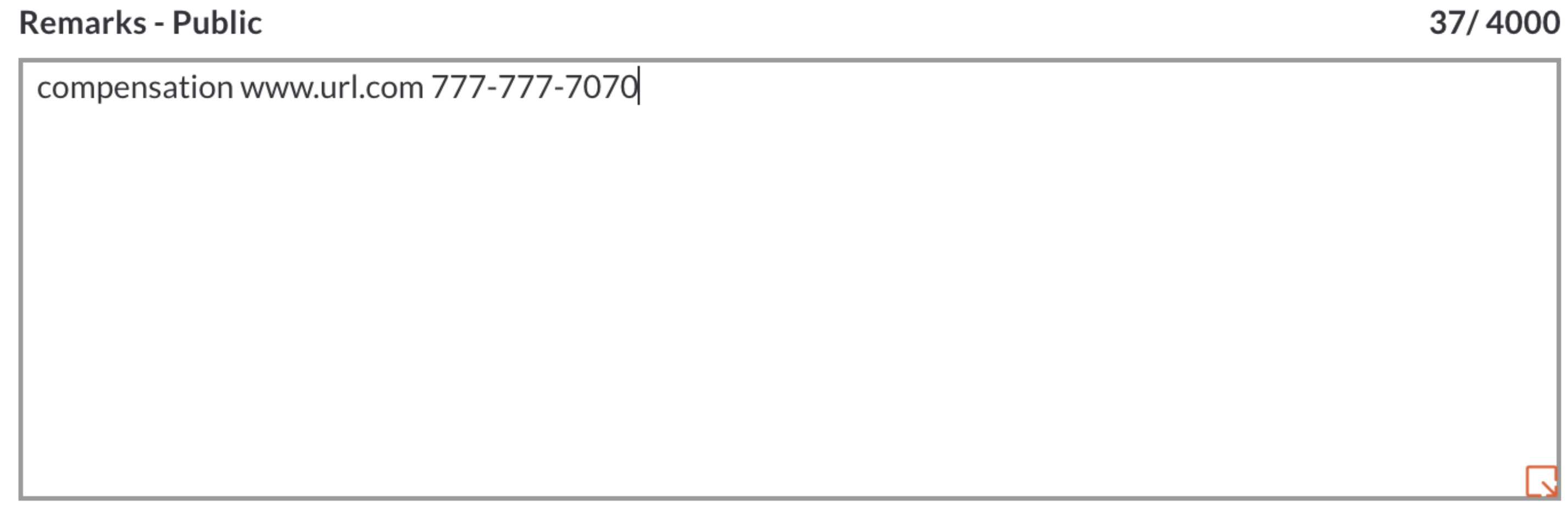
Therefore, this pop-up will inform that there are words included in the remarks field you should use with caution. Please note that if there's a typo in the listing, this could trigger the pop-up. For example, if you miss a space between a period and the following word, that could be flagged as a URL.

In this example, a mix of prohibited and acceptable information has been entered. You can see the words to use with caution underlined in red.
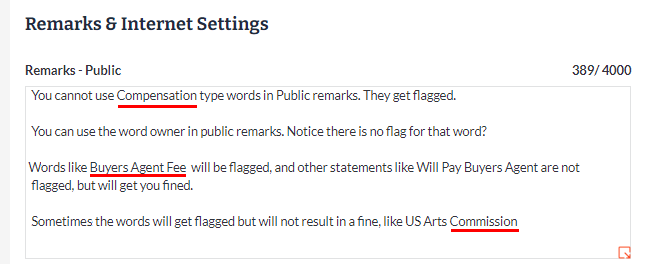
The words checker has flagged those words, but the context should be double checked before moving forward.

If you feel you're using a word in a way that's not prohibited, you can bypass the checker. The remarks word checker is there as a courtesy and will not prevent you from moving forward with your listing.
To confirm, if the system cautions about potential prohibited language as shown above are ignored and prohibited information is found present in the system, as an enforcement policy no warning will be applied, an immediate fine will be assessed, and the language will be removed by Bright.
NAR Settlement News & Updates
Stay informed about important industry changes and get all the information you need to navigate them.