
Save yourself time, effort, and hassle by counting on the offer management tools already at your fingertips!
NEWS
System Updates: November 12
Learn about the new and improved options for submitting offers from a listing, and other updates in Bright.
With Bright’s Offer Management integration, listing agents can link their offer management provider for offers to be submitted directly from a listing. To allow buyers’ agents to more easily submit offers on listings where this option is enabled, we have updated several displays in Search and reports.
New button for Submit Offer on Agent Full and Agent 360 displays.
The Submit Offer link on the Agent Full and Agent 360 displays now has an updated button design and has been moved to the action bar with the other icons:
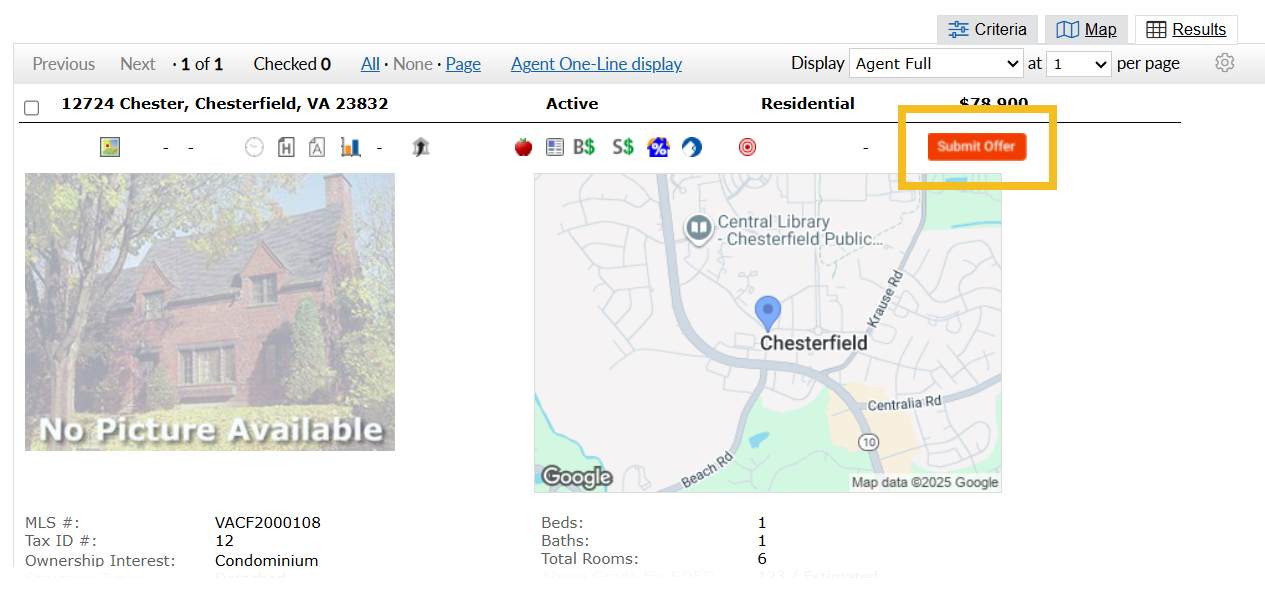
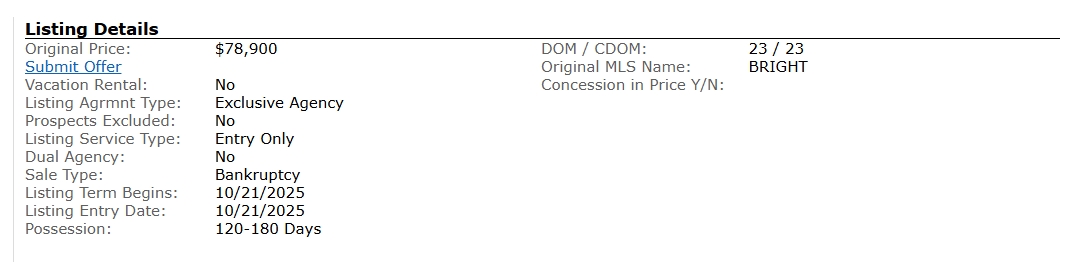
Additional Submit Offer link now available under Listing Details.
A new Submit Offer link has been added to the Listing Details section for the following displays:
- Agent Full
- Agent One-Page
- Agent Custom w/Tabs
- Agent Synopsis
- Agent 360
Updated Submit Offer icon design on the Agent One-Line display.
The Submit Offer icon is now orange to differentiate it from other icons in the one-line report:

Listing Performance Report updates for Residential Lease properties.
The Listing Performance Report has been updated to reflect the following for listings in the Residential Lease property type:
- Sold Listings (Past 4 Quarters) has been relabeled Leased Listings (Past 4 Quarters), and “Sold Price vs Original Price” has been relabeled “Leased Price vs Original Price”
- Under MLS Email Activity, “Buyer Viewed: Automatic Emails” and “Buyer Viewed: Direct Emails” have been relabeled “Client Viewed: Automatic Emails” and “Client Viewed: Direct Emails”
Recent articles
Back to Top