
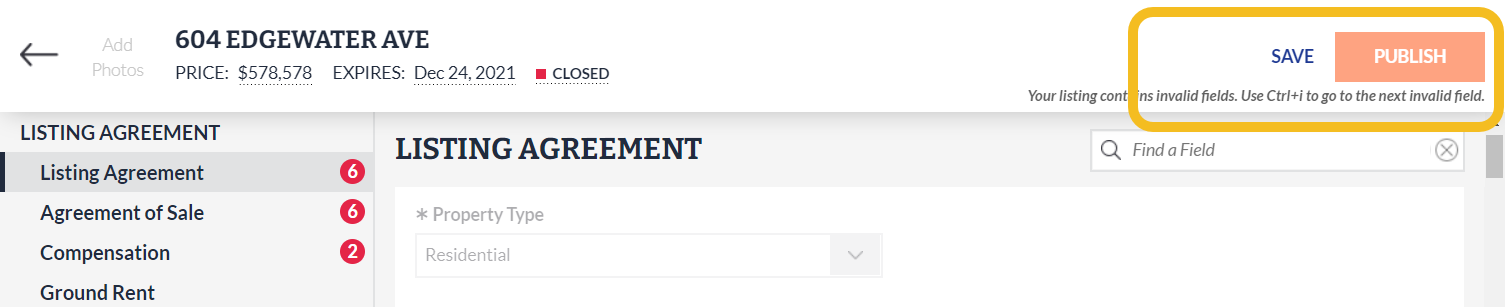
Based on your requests, the Save Now option in Listing Management has been moved next to the Publish button and is now more prominent.
NEWS
Updates to listing entry and search: September 14
Learn about some of the newest updates in Listing Management and Search.
The following items were released September 14:
New location for save option during listing entry.
Based on your requests, the Save button in Listing Management has been moved next to the Publish button and is now more prominent. Learn more here.
Brokerage license information is now available directly from Agent Reports.
To make brokerage license information more easily accessible, a link to the Broker of Record’s license has been added to the following Agent Reports:
- Agent Full HTML
- Agent Full PDF
- Agent Short HTML
- Agent Short PDF
- Agent One-Page HTML
- Agent One-Page PDF
- Agent Synopsis HTML
- Agent Synopsis PDF
This information is now available under the Listing Office section:

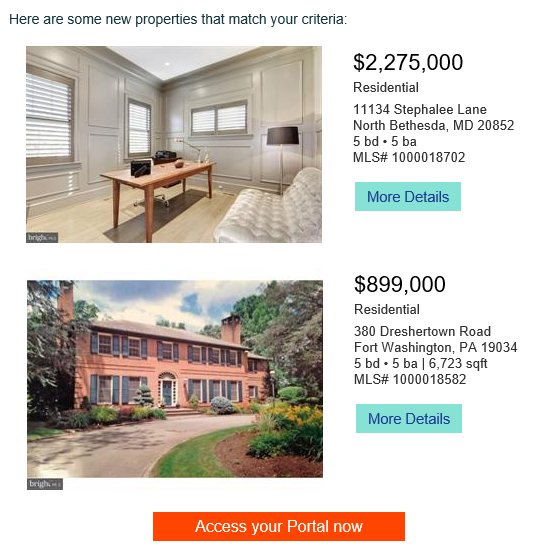
MLS Number added to portal email displays.
To make it easier for you and your client when discussing a listing your client receives over email, the MLS number for the listing is now included in the email itself:
For information on past system releases, click here.
Recent articles
A new photo viewer is available to easily view the photos attached to your listing, and Foundation Details is now required for certain structure types in Bright.
Back to Top